How to Make a Wedding Budget Spreadsheet (Step-by-Step Guide)
By Altar & Agenda · Updated
A wedding budget is the first planning decision that makes every other one easier. Once you know your number, picking a venue, trimming the guest list and choosing where to splurge stop being arguments and start being arithmetic.
This guide walks through how to set up a wedding budget spreadsheet from scratch in Excel or Google Sheets: the columns you need, how to split your total into categories, how to track deposits so nothing sneaks up on you, and how to see what each guest really costs. You don't need to buy anything to follow along.
On this page
- Step 1: Agree on a total before you look at anything
- Step 2: Set up the spreadsheet columns
- Step 3: Split your total into categories
- Step 4: Track quotes before you book
- Step 5: Build a payment schedule (this is where budgets go wrong)
- Step 6: Know your cost per guest
- Step 7: Review it every two weeks
- Common wedding budget mistakes
- Frequently asked questions
- Want it done for you?
Step 1: Agree on a total before you look at anything
Before you open a spreadsheet, have one honest conversation: what is the most you can spend without regret? Include every source of money, such as your savings, what you can set aside each month until the date, and anything family has offered. Write down who is contributing what, and whether any of it comes with expectations (a parent who wants to invite their friends, for example).
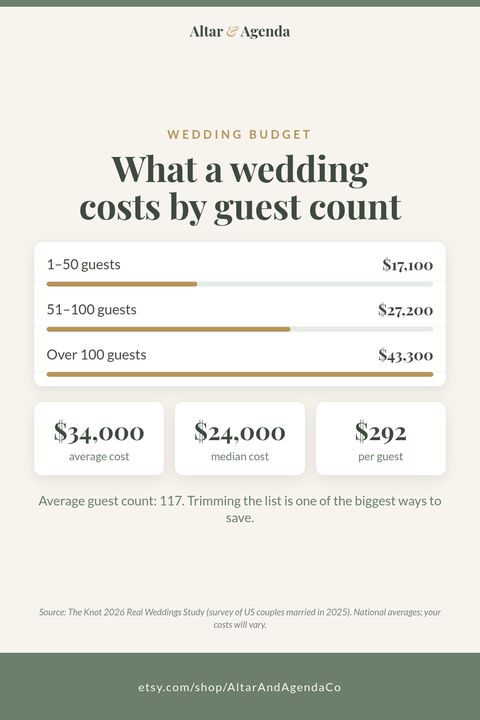
For context, The Knot's 2026 Real Weddings Study (a survey of US couples married in 2025) put the average wedding cost at about $34,000 (The Knot's cost page gives $34,200) and the median at $24,000. The median is the more useful number for most couples: half of weddings cost less than that. Your total should come from your finances, not from an average.
Add a buffer of 5 to 10% on top of your planned spending. Weddings rarely come in under budget, and the buffer is the line item couples most often wish they had.
Step 2: Set up the spreadsheet columns
Create one row per budget category and these columns:
| Column | What goes in it |
|---|---|
| Category | Venue, catering, photography, attire, and so on |
| % of total | The share of your budget you're giving this category |
| Budgeted | Total budget × the % (a formula, so it updates if your total changes) |
| Quoted | The best real quote you have so far |
| Spent | Everything actually paid |
| Left | Budgeted − Spent |
| Status | "On track", "Near limit" or "Over" |
The key is that Budgeted is a formula, not a typed number. Put your total budget in one cell at the top (say B1), and make every Budgeted cell =B1*C5 (or whichever row). When your total changes, and it will, every category updates on its own.
For Status, a simple formula works: =IF(F5>E5,"Over",IF(F5>E5*0.9,"Near limit","On track")). Conditional formatting (red for Over, amber for Near limit) makes problems jump out.
Step 3: Split your total into categories
There's no official split, but a starting point many couples use looks roughly like this:
- Venue and catering: around half of the budget combined
- Photography and video: about 10 to 12%
- Attire and beauty: about 5 to 8%
- Flowers and décor: about 8 to 10%
- Music (DJ or band): about 5%
- Stationery, favors, cake, rentals, transportation, officiant, rings, gifts: the rest
- Buffer: 5 to 10%
For a full table with dollar amounts at $10,000, $20,000 and $30,000, see our wedding budget breakdown by percentage, or enter your own total in the free wedding budget calculator.
Treat this as a first draft, then adjust it to your priorities. If photos matter more than flowers, move money between those rows and watch the totals stay balanced.
To sanity-check your numbers, here are average 2025 US costs from the same Knot study:
| Vendor or item | Average cost (2025) |
|---|---|
| Reception venue | $12,900 |
| Catering | $80 per person |
| Live band | $4,500 |
| Photographer | $3,000 |
| Wedding rings | $3,000 |
| Flowers | $2,800 |
| Alcohol | $2,800 |
| Videographer | $2,300 |
| Wedding planner | $2,100 |
| Wedding dress | $2,100 |
| Event rentals | $2,000 |
| DJ | $1,800 |
| Transportation | $1,100 |
| Wedding cake | $540 |
| Invitations and stationery | $510 |
| Officiant | $260 |
Prices vary a lot by region and guest count (the same study found averages from $17,000 in Wyoming to $57,000 in New Jersey), so use real quotes as soon as you have them.
Step 4: Track quotes before you book
Add a separate tab for quotes. For each vendor you're considering, record the vendor name, category, quoted price, what's included, and any notes (minimums, overtime fees, travel fees). When you compare two photographers, the cheaper quote isn't always cheaper once you count the hours and the album.
A small trick that saves arguments: add a column that compares each quote with that category's budget (=Quote−Budgeted). Positive means over budget, and you can see it before you sign.
Step 5: Build a payment schedule (this is where budgets go wrong)
Most wedding budgets don't fail on the total. They fail on timing: a deposit you forgot, a final balance due two weeks before the wedding when everything else is due too.
Make a payments tab with one row per payment, not per vendor:
| Vendor | Payment | Amount | Due date | Paid? | Status |
|---|---|---|---|---|---|
| Venue | Deposit | Yes | Paid | ||
| Venue | Final balance | No | Due soon |
For the Status column, a formula like =IF(E2="Yes","Paid",IF(D2<TODAY(),"Overdue",IF(D2-TODAY()<=14,"Due soon","Upcoming"))) flags anything overdue or due in the next two weeks. Sort by due date and you have a cash-flow plan.
Then link it back: the Spent column on your budget tab can use SUMIFS to add up paid amounts by category, so you only ever type a payment once.
Before you sign each contract, also write down the cancellation terms, the final payment date and who your contact is. Those details are much easier to find in one row than in an inbox.
Step 6: Know your cost per guest
Divide your total budget by your expected guest count. The Knot's 2025 figures worked out to roughly $292 per guest on average, with an average of 117 guests. Weddings with 1 to 50 guests averaged $17,100; 51 to 100 guests, $27,200; and over 100 guests, $43,300.
That's why the guest list is the biggest lever you have (our guide to how many wedding guests to invite helps you estimate it). But cutting 20 guests doesn't save 20 × your cost per guest, because some costs are fixed (the photographer and DJ usually cost the same for 80 or 150 people) and some scale per head (catering, bar, cake, rentals, stationery). Split your categories into "fixed" and "per guest", and you can calculate what a smaller list really saves:
Savings = guests removed × (per-guest costs ÷ current guest count)
Step 7: Review it every two weeks
Put a recurring 15-minute check-in on your calendar. Update quotes and payments, look at anything "Near limit", and move money between categories if your priorities shift. A budget you look at regularly is one you'll actually stick to.
Common wedding budget mistakes
- Forgetting the small stuff. Postage, tips, alterations, marriage license fees, vendor meals and service charges add up. Give them their own rows.
- Comparing quotes that aren't alike. Check hours, inclusions and taxes before you call one cheaper.
- No buffer. Something always costs more than expected.
- Tracking in three places. Notes app, email and a spreadsheet means none of them is right. Pick one.
Frequently asked questions
What should be included in a wedding budget spreadsheet?
One row per category with a percentage, a budgeted amount (as a formula from your total), the best quote, the amount spent and the amount left. Add a separate payments tab with one row per deposit or balance and its due date.
What is a realistic wedding budget?
It depends on your finances and location, not on averages. For reference, the median US wedding in 2025 cost $24,000 and a quarter of couples spent about $12,000 or less, according to The Knot.
Is Google Sheets or Excel better for a wedding budget?
Either works. Google Sheets is easiest to share with a partner or family in real time; Excel works offline and has a few more formatting options. Every formula in this guide works in both.
How much should I keep as a buffer?
At least 5% of your total, and 8 to 10% on a short timeline. Use it for tips, service charges, taxes and anything you forgot.
How do I calculate cost per guest?
Divide your total by your expected guest count for a rough figure. For a more useful number, divide only your per-guest categories (catering, bar, rentals, stationery) by your guest count. That's what each extra guest really costs.
Want it done for you?
Everything above works in a blank spreadsheet. If you'd rather skip the setup, our Wedding Budget Tracker has it ready-made for Excel and Google Sheets: 18 editable categories, a payment schedule with due-date alerts, monthly cash flow, a quote comparison and a guest-count what-if tab. It's also included in our Complete Wedding Planner and the Wedding Planner Bundle.
And if you're just getting started, grab our free 12-month wedding planning checklist (one page, no sign-up).
Sources
- The Knot, The Average Wedding Cost and 2026 Real Weddings Study data read-out (10,474 US couples married in 2025).
Disclosure: Altar & Agenda makes the templates linked above. Cost figures are from The Knot 2026 Real Weddings Study (US couples married in 2025) and are national averages; your costs will vary.
Free: one-page 12-month wedding checklist
60 tasks from "set your budget" to thank-you notes. PDF, no sign-up.
Get the free checklistBrowse our planners on Etsy